Plans & designs to make tech better
Product Strategist β€’ Advisor β€’ Developer
Interface Designer β€’ Architect β€’ Brander

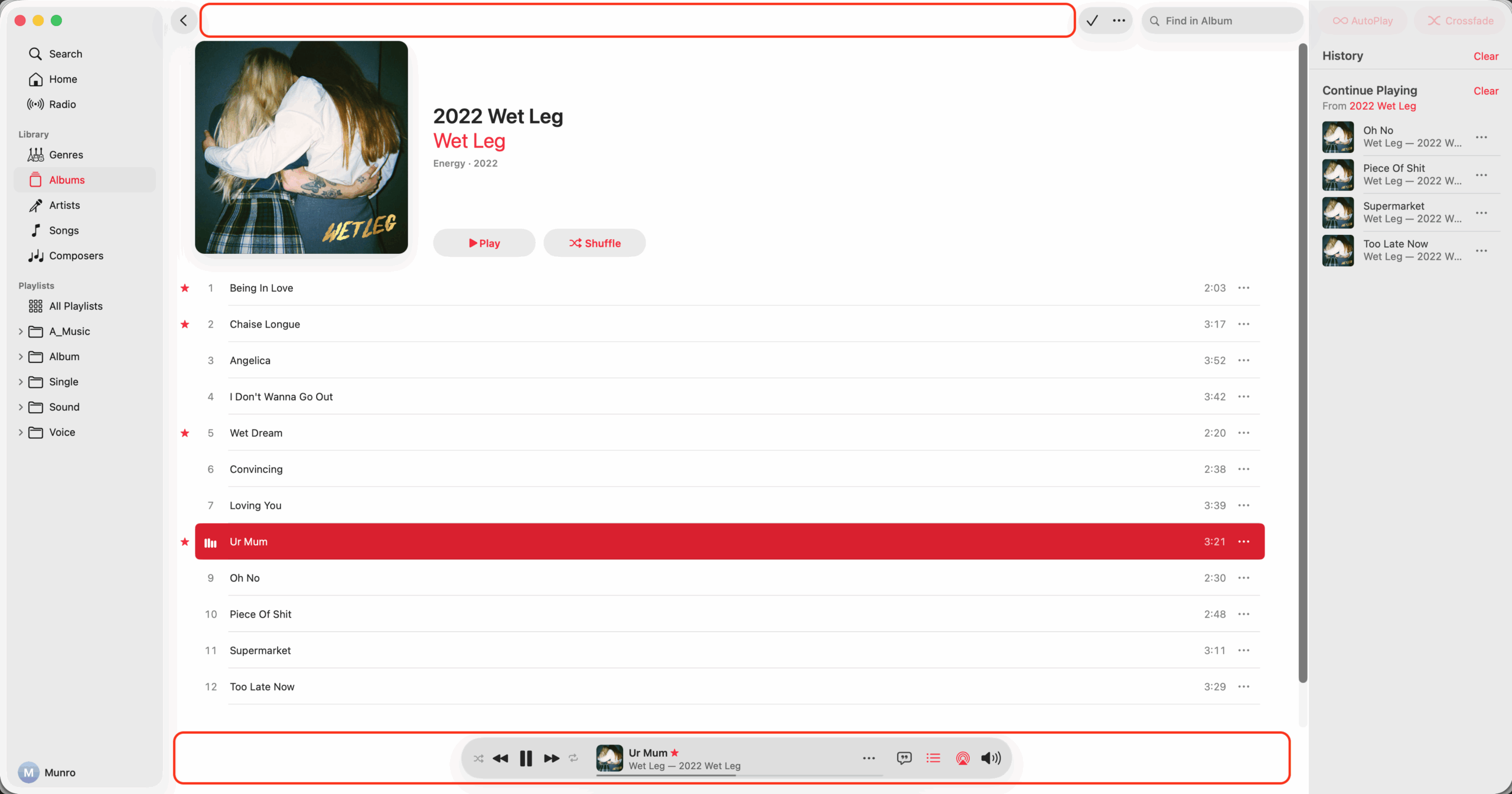
Leave MacOS Toolbars At Top

I appreciate the gusto if this is purely experimental, but I think the design, function, and placement of this separate bottom toolbar in the Music app may be the single worst UI change in macOS 26.

Suggested Changes

  • Move and merge the full toolbar back to the top
  • Stay in same place when queue or lyrics selected
  • Make volume popup from toolbar and have mute
  • Collapse volume popup when clicked second time
  • Don't blur song title and info when mouse over
  • Move star icon to the toolbar and always show
  • Make all icons including playback the same size
  • Move shuffle to right of playback, left of repeat

Display 16 Apps Instead Of 9

I think that Apple or any company making operating systems should display an even amount of 16 apps in home screen tabs, app folders, and app menus on iOS, tvOS, and other operating systems, instead of the hard to organize and odd amount of 9 apps.

What

  • Display 16 apps in folders, or alternatively 24
  • Grid of 4x4 apps in folders, or alternatively 4x6
  • Always show an even amount of app columns
  • Always show an even amount of app rows

Why

  • Grouping apps in groups of 2, 4, or 6 makes sense logically
  • With groups of 4 people can easier create a mental model
  • Rotating from portrait and landscape shows the same apps
  • People may be buying or using less apps with folders of 9

Put Bullet Point On Keyboards

I wonder if we should design keyboards to input the bullet point character (U+2022 β€’) instead of the backtick character (U+0060 `), which is currently the key above the tab key and to the left of the number 1.

Notes

  • Why 1 β€’ The bullet point is a very common symbol used in lists and HTML
  • Why 2 β€’ The bullet point character is an excellent information separator
  • I wonder if the bullet point should be used as a data/table separator
  • Column Data 1 β€’ Column Data 2 β€’ Column Data 3 β€’ Column Data 4
  • I wonder if the bullet point should be used as a better colon replacement
  • Title of This Book β€’ Cool Subtitle of This Book With a Really Long Name
  • I wonder if the bullet point could even be used as a filename/URL separator
  • Example β€’ 2023-08-20β€’bullet-point-character-on-keyboardsβ€’munro-stewart

August 20, 2023

Could iPhone 8 Have Flexible Screen Sides?

Update - April 20th, 2017

We have more rumors and real analyst articlesΒ which show that my idea of the iPhone 8 having a flexible screen wrap around the sides isn't likely at all. Not surprising of course, and the first rumor to really disprove my crazy theory came just a few days after I wrote this article. For people who are interested in finding out what features will be in the "iPhone 8", don't bother reading this article. For people interested in hardware design or possible form factors for future iPhones or other mobile phones, you might still be interested in reading this. I talk about how future phones and mobile devices could have flexible screens that wrap around the side, as well as a couple of the uses this design would have.

Original Article

First of all, to get up to speed on some of the possible rumors, here is a quick overview by AppleInsider, which they have been using in their articles about the next big redesign of the iPhone. For instance, this quick overview is included in their last rumor I read today, Apple's 'iPhone 8' again rumored to feature reinforced glass back, stainless steel frame

  • Sept. 2017 launch
  • Screen sized 5.1"-5.2"
  • Edge-to-edge OLED
  • Curved glass back, screen
  • Dual-lens camera
  • 10nm "A11" processor
  • Wireless charging
  • Touch ID, FaceTime camera, speaker embedded in screen

AppleInsider and many others have also noted various times about 5.8" OLEDs being produced for the next iPhone. And that maybe the actual size of the screen will end up being a usable 5.1" even though the OLED screens being manufactured are 5.8" in size. One possibility might be that they are getting larger sized screens produced, but they will be cut down to a lower 5.1"-5.2". Another is that with a rounded screen, extra length is added to the actual screen size, 5.8", to make the usable screen size appear over a smaller real life dimension, 5.1". A third option would be that there will eventually be two different sizes, both a 5.1-5.2" device, and later or the following year a Plus sized 5.8-5.9" device.

However, one guess that I have is for something a bit different, which I don't think has been noted or suggested in most of the rumors.

A "Screen" On Each Side Of The Phone

I wonder if the reason for the discrepancy in screen sizes to date could be because of a new "feature" for this all new design. I think the usable and visible size on the front of the screen could be about 5.1", but that the actual screen continues and wraps around each side of the iPhone. And we would be able to touch each side of the device to provide other types of input, such as scrolling up and down without touching the front of the screen.

Meaning, the "screen" we see is just 5.1", but an "invisible" screen wraps around the sides.

Likely the OLED display would wrap around just the left and right side, not the top and bottom. Even if the screen wraps around the edge, it might not mean that we see an interface or image on the sides of the device either. Meaning, the "screen" we see is just 5.1", but an "invisible" screen wraps around the sides. And we can touch the sides of the device and it can respond in different ways. Though it could also provide an image possibly, for instance in what could appear as different "buttons" on different parts of the screen side.

Oh yeah, and when I say I "think" this could happen, I might actually mean "hope". Because I think it could be a good idea to allow the sides of digital devices to be touched for input by users. I think it would be a good design, and potentially be a very useful and intuitive interface option. What I mean, is I'm just guessing here everyone. I definitely don't have an inside track to what is actually going on. I have no idea what is going on, unlike people like writer John Gruber of Daring Fireball, or Apple analyst Ming-Chi Kuo.

Why Would A "Side-Screen" Be Useful?

So why would this all new design have a screen that wraps around the side? What could you do with this extra design feature? Since it could allow touch input, pretty much anything. As I mentioned, I think the most obvious use is for scrolling up and down by using your thumb on the side of the device.

You would just touch your finger along the side of the device to scroll through and select items on the screen.

Other options for the side screen could include "buttons" on the side of the device. Maybe from the front you just see skinny rectangles about a centimeter high along the edge, possibly even in different colors. And touching the side of the device clicks that "button". Having pressure sensitive force touch options using the side of the device makes sense too. Anyway, the options are numerous, and I think the most obvious use is for vertical scrolling or scrolling through options on the screen without having your finger or thumb covering the front of the screen.

By the way, I think a screen extending to the sides of a device could eventually be used in something like the Apple Watch possibly too. You could potentially remove the digital crown, a moving part. You would just touch your finger along the side of the device to scroll through and select items on the screen. So if this touchable side screen idea is something that works out, I would expect to see it in many more devices in the future by Apple and others.

What Size Will The Screen Be?

The rumors now seem to be pointing to a usable screen size of 5.1-5.2" for the iPhone 8. And that the actual screen being produced might be about 5.8". So above I've been discussing how that rumor might apply to a new iPhone with a screen that wraps around the edges. However I'll add that I think it could be possible that another option for the iPhone 8 is that it's usable size will remain at 4.7". Exactly the same size as the iPhone 6 and 7. And that those extra 0.4-0.5 inches in the 5.1" OLED panelΒ could be used to wrap around the sides of the device.

There are a couple reasons why I wonder if the iPhone 8 will come in the smaller 4.7" screen size. First off, it seems like there was a lot more rumors about OLEDs of the larger 5.8-6.0" size much earlier, but not as much lately. It seems like the 5.1-5.2" OLED panel size has been in the rumors more lately. I wonder if those larger sizes were testing for the current 5.5" Plus iPhone. And these newer rumors of the 5.1" OLED panels are testing and production for the current 4.7" iPhone.

More importantly though, I think Apple could potentially stick with a 4.7" usable screen size for the iPhone 8 to keep the resolution the exact same as the iPhone 6 and 7, at 1334x750, with the PPI at 326.

Then in the end Apple could have decided to start producing their first OLED iPhone in only one size, the smaller 4.7" size. Reasons for this decision could include that they don't know if they can meet demand by going all in with OLED in the first year. They want to still at least introduce their new design for the iPhone 10th anniversary. And they will still have a new 7S Plus released at the same time. So basically, they may have decided to not put all their eggs in one basket by only having a new iPhone 8 and 8 Plus with the new design, OLED display, and other technology. So they could be releasing an iPhone 7S and 7S Plus, along with the iPhone 8.

More importantly though, I think Apple could potentially stick with a 4.7" usable screen size for the iPhone 8 to keep the resolution the exact same as the iPhone 6 and 7, at 1334x750, with the PPI at 326. And that the rumors of the 5.1" screens being produced will wrap around the edges of the smaller iPhone's usable 4.7" screen. Reason being, they can't make the usable screen size bigger, going from 4.7" to 5.1", without keeping their magical 326 PPI retina display.

So they'd have to use the 1920x1080 HD resolution from the 5.5" iPhone Plus or come up with a new resolution, such as 2560x1440 for a 5.1" iPhone. That is definitely a possibility, but would require another resolution form factor. So I think it's also possible that they may be happy with the current resolutions and usableΒ screen sizes. Resulting in them keeping the one-handed 4.7" 1334x750 screen for the regular iPhone 8 in 2017, and the larger 5.5" 1920x1080 screen for the iPhone 8 Plus version in 2018, the following year.

Conclusion

So to recap, I have two possible predictions that are bit contrary to the rumors that I have been reading about for the next big iPhone redesign, the potential iPhone 8. I think that contrary to reports, the screen size of the iPhone could stay the same at a usable 4.7", even though the OLEDs produced have an actual size of 5.1-5.2". Then, the next year, an iPhone 8S Plus version could be produced with a usable screen size of 5.5", with an actual OLED panel size of 5.8-6.0".

Secondly, I wonder if that extra bit of screen panel is used to curve and wrap around the left and right sides of the device. That the side of the device will be used as a touch screen for input, effectively replacing buttons on the side and offering more options for input. This user input on the side of the device will change depending on the application. It could take the form of scrolling, to selecting elements, to clicking soft buttons, or anything else. And I think it would be a great idea and a potentially good design for mobile devices of all kinds in the future.

Siri Should Integrate Text Search

I wish that Siri and Spotlight search were integrated so that holding the home button was just "Search".

Notes

  • It would bring up a search text box at the top and Siri at the bottom so you could search by text or voice depending on what you wanted to use.
  • It would search both your device and the web when you are connected to the internet, but only search your device and use better voice control options when you aren't.

Screen Size Of iPhone 5 Is Still Too Small

  • I think Apple might have messed up with the new design of the iPhone 5 and iPod Touch.
  • The one thing they really needed to update after 5 years was the screen size, and I don’t think they did that correctly.
  • It should have a 1280x720 screen from 4.3 to 4.6 inches and there should be no home button on the front.
  • They needed to change the design and screen more, making the screen cover most of the device.
  • The home button could be a button on the side.
  • Yes it would hurt compatibility with old apps a bit more, but they would still run.
  • And this is finally the device they made with a bigger screen.
  • The new design feels half-hearted with just the longer 4.0 inch screen.
  • They really needed to make a bigger change.
  • And why not move to a more common resolution like 1280x720 when finally making the screen larger.
  • A much larger screen covering most of the device and no home button is what they needed to do in my opinion.

Eliminate Mouseovers And Tooltips

I don't like pop ups, tooltips, mouseover menus, and information popups used in the design of software and websites.

On Windows 95 and 98 I used a program called TweakUI to disable tooltips throughout the operating system, but I miss it when using Windows 7. So I don't think I have ever really liked tooltips or mouseovers, but having used iOS for a couple years now I feel even stronger about this. I feel that tooltips or anything that automatically pops up in a little window or changes the interface when you move your mouse over it is distracting to the user interface and gets in the way of the user interacting with the computer. I think if software and websites were designed completely without mouse rollover effects and tooltip popups that the user's experience with computers would benefit greatly.

What Is A Tooltip Or Mouseover?

First of all I'll define what I mean by a tooltip or mouseover so you know what I am talking about. I am referring to any time you move your mouse over an object on screen and anything on the screen other than the mouse cursor changes. A simple mouseover effect on a menu or button can be useful and not too intrusive, but it is the simplest type of mouseover. A link on a website being underlined when you move your mouse over it is another example that isn't too annoying. A tooltip such as used often in Microsoft Windows supposedly to provide you help with what you will be clicking on is a bit annoying. A little window popup of information when you move over a link or other object is even more annoying. Special OS features like a small window of an application showing when you move your mouse over it on the taskbar is also a mouseover. All of these I refer to as mouseovers and while it may seem extreme I think all of these should be eliminated from user interface design.

1. The Interface Actions Should Be Simple And Clear

We simply don't need extra information coming up on a mouseover because the interface should clearly show where the user should click the mouse to provide actions or more information. We can now design interfaces that are more simple and clear so that people understand where they need to click. They can see the menu, the buttons, the links, and any other information that they need to click. Rollovers might look fancy but at this stage in human computer interaction and software design if a user does not know where to click simply by looking at the screen then the design of the software is very poor.

2. Users No Longer Need A Guide

When computers were text based like DOS we didn't have tooltips. Then the graphical user interface was created and became extremely popular especially with Windows 95. When the graphical user interface was created it provided so much for designers and developers of software. There was no limit to what they could do. They could provide all kinds of features, more information, and special effects. I suppose they thought we needed to provide people help for what they were clicking on or what they might want to do. However, now that users have been using computers for at least fifteen years we no longer need to be held by the hand. People know where they need to click to access menus or get more information.

3. Popups Get In The Way Of What You Are Doing

This is the real problem with any kind of mouseover. Remember when you would browse the internet in 1998 and all these windows would pop up with advertisements? It was extremely annoying and became a real problem. It got in the way of what the user was actually trying to do. While they aren't quite as annoying, tooltips and mouseovers have the same problem. Often the user is just moving their mouse around on the screen and something changes or pops up on different parts of the interface. This happens way too often in many operating systems, applications, and websites. It simply gets in the way of what the user is actually trying to do and the actions they are trying to initiate themselves.

4. The Visual Change In The Interface Is Distracting

Two of the common principles that I have read about technology, and life in general, over the last ten or more years is that things need to be simpler and less distracting. My first point above addresses the fact that mouseovers don't encourage simplicity, but mouseovers are also distracting. Just like everyone talks about multiple applications, instant messaging, and other multitasking as being distracting, interface changes within a single piece of software is distracting. All of the visual changes in the interface that happens when the user simply moves their mouse on screen very subtly distract the user from what they are doing. By the way, I also feel that the blinking cursor on screen should go for this same reason and I don't understand why we need it to blink.

5. Mouseovers Rarely Provide Really Useful Information

Besides being unneeded and annoying I find that mouseovers often don't provide much useful information anyway. Menu and button effects simply jazz up the interface but the user should already know to click there anyway. Even worse, buttons or links with tooltips and information popups could just be clicked on nearly as quickly to find out what they do or to find more information. I also don't really care to see a small little window of a video or a small screenshot of an application when I move my mouseover the taskbar. With all of these, the little bit of information given isn't worth it when it would take just as long to click on the object myself.

6. I'll Click It Myself If I Want To

The basic principle for my suggestion of possibly eliminating all mouseovers or popups is that clicking the mouse or the screen is simply better in all cases. The effort to click the mouse makes sure that the user is initiating the action and it is also not a time intensive action as it takes not much longer than moving your mouse over something. If I want to launch a menu I'll click on it. If I want to see more information on a link I'll click on it. If I want to switch applications I'll click it. We don't need things changing all over the screen trying to help us.

Conclusion

I think that the touch interface of iOS has brought many improvements. One of these has been the elimination of mouseovers since there is no mouse. Any changes of the interface are a direct result of the user touching the screen and initiating an action themselves. I believe this is a good design of software and that all operating systems, applications, and websites should adopt this behaviour. If the user always has to click or perform some other definite action to get something to happen the interface is less distracting, more simple and clear, and doesn't inadvertently get in the way of what the user is actually trying to do.

December 20, 2010